Document AI vs OCR: Choosing the Right Tool for Your Pipeline
OCR and Document AI solve different problems. This guide explains when to use each, how they complement each other, and what the accuracy tradeoffs look like.
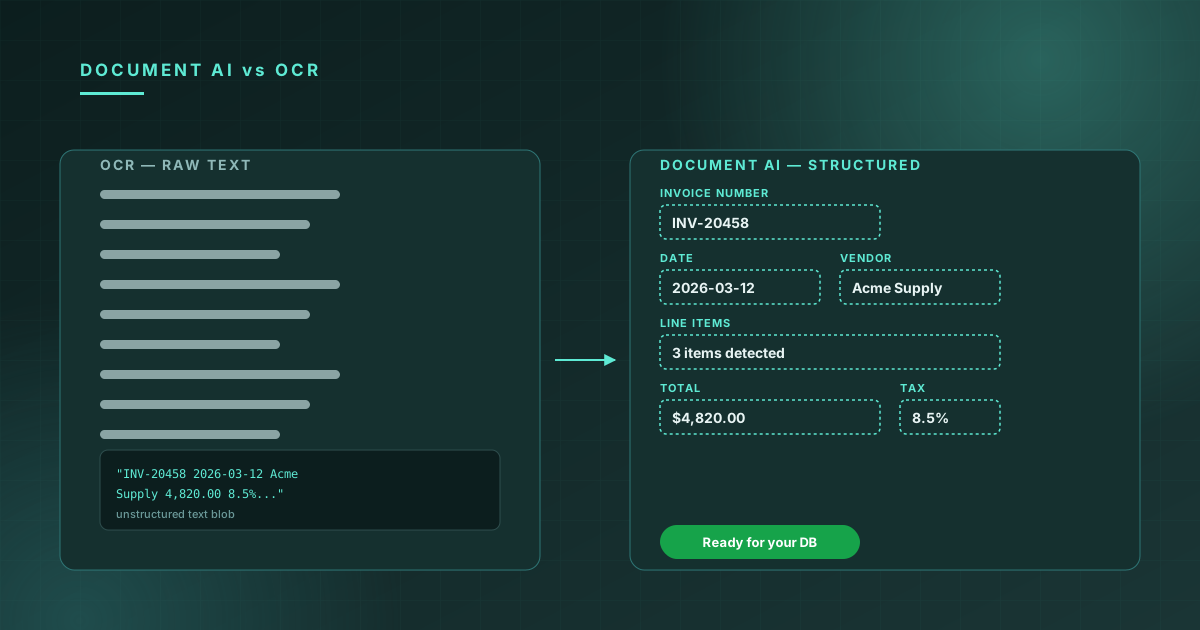
"OCR" and "Document AI" are often used interchangeably, but they're solving fundamentally different problems. Choosing the wrong one leads to either over-engineering (running complex extraction when you needed raw text) or under-engineering (getting raw text when you needed structured data).
What each one does
OCR (Optical Character Recognition) converts image pixels to text. The output is a string of characters, preserving the document's textual content but not its semantic structure. You get "Date: 2024-01-15" as a string; you don't get a typed date field.
Document AI understands what the text means. It returns structured, typed fields: { dateOfBirth: { value: "1990-04-21", confidence: 0.98 } }. It knows that "Date" on a passport is the issue date, while "Expiry" is a different field, and that both should be formatted as ISO 8601 dates.
When to use OCR
Use OCR when:
-
The document structure is unpredictable. If you're processing arbitrary documents — articles, emails, scanned books — there's no schema to extract against. Raw text is what you need.
-
You're building full-text search. Search indexes want text, not structured fields. OCR + indexing is the standard pattern.
-
You need maximum recall. OCR captures everything in the image. Document AI extracts defined fields and ignores the rest. For discovery workflows where you don't know what's important, OCR preserves more information.
-
Latency is critical. OCR is faster than Document AI because it doesn't run the additional reasoning step for field extraction and validation.
When to use Document AI
Use Document AI when:
-
You have a defined schema. Passports, driver's licenses, invoices, tax forms — these have well-defined fields. Document AI turns them into structured JSON without you writing a single regex.
-
Type safety matters. If downstream code expects
expiryDateto be a date, not a string that might say "01/15/2030" or "15 Jan 2030" or "Jan 15, 2030" depending on locale, Document AI normalizes this for you. -
You need per-field confidence. OCR confidence is document-level. Document AI confidence is field-level, enabling threshold-based routing to human review.
-
You're doing KYC or compliance. Compliance workflows need specific fields extracted correctly. Feeding raw OCR text into a compliance engine is fragile.
The complementary pattern
Many mature pipelines use both:
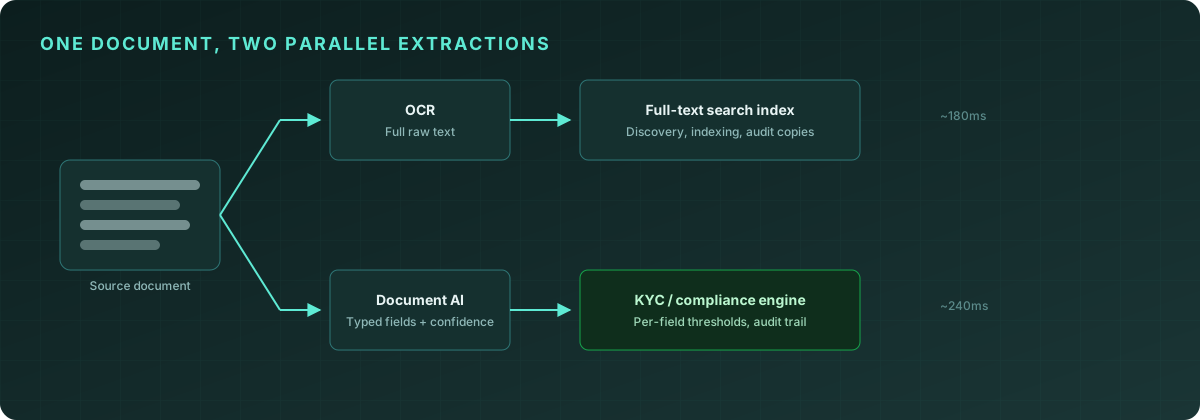
// Parallel extraction
const [ocrResult, structuredResult] = await Promise.all([
  client.ocr.extract({ file: image }),
  client.documentAI.extract({ file: image }),
]);

// OCR goes to search index
await searchIndex.index({
  documentId,
  text: ocrResult.text,
  timestamp: new Date(),
});

// Document AI goes to KYC verification
await kyc.verify({
  name: structuredResult.fields.fullName?.value,
  dob: structuredResult.fields.dateOfBirth?.value,
  documentNumber: structuredResult.fields.documentNumber?.value,
  confidence: structuredResult.overallConfidence,
});
This pattern is common in healthcare (full document indexed for discovery, specific fields extracted for records), fintech (full document for audit, specific fields for compliance), and HR tech (full document for storage, specific fields for onboarding workflows).
Accuracy expectations
Both products return confidence scores, but interpret them differently:
| Metric | OCR | Document AI | |--------|-----|-------------| | Overall confidence | Document-level | Document-level + per-field | | Latency | ~180ms | ~240ms | | Failure mode | Degraded text quality | Missing or low-confidence fields | | Best case accuracy | 99.4% | 98.7% per field |
Document AI is slightly slower because it runs OCR internally and then adds the semantic extraction step. The latency difference (~60ms) is negligible for most applications.
Both products are available from day one on the Starter plan. Try them in our live demos →