Face Liveness Detection: Stopping Spoofing Attacks Before They Start
How passive face liveness detection blocks printed photos, screen replays, 3D masks, and deepfakes — and how to add ISO/IEC 30107-3 compliant anti-spoofing to your onboarding flow.
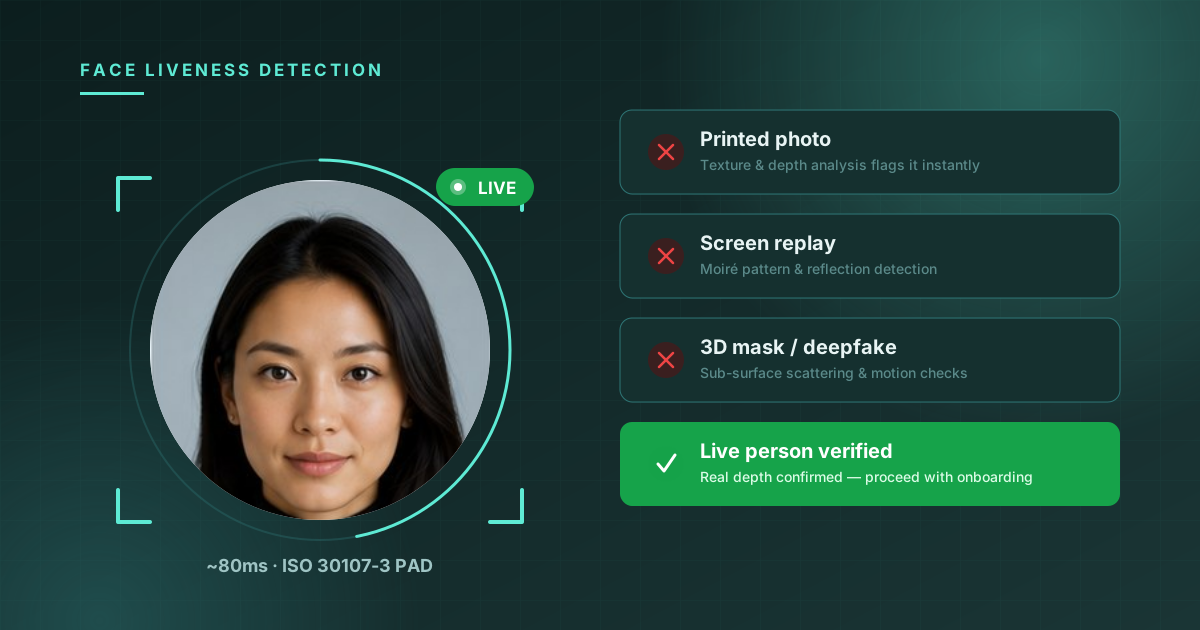
In 2024, a finance worker in Hong Kong joined a video call with what appeared to be his company's CFO and several colleagues. Every person on the call was a deepfake. The worker authorized transfers totaling $25 million before anyone realized the entire meeting was synthetic.
That incident made headlines because of the dollar amount, but the underlying technique — presenting a synthetic or replayed face to a camera to impersonate a real person — is something identity verification systems have been fighting for years at much smaller scale, every time someone opens a bank account, requests a password reset, or completes KYC onboarding.
Face matching alone can't stop this. A 1:1 face comparison only answers "do these two images show the same person?" It says nothing about whether the image being compared was captured from a living human in front of the camera right now, or from a printed photo, a phone screen, a silicone mask, or a GAN-generated video. That's the question liveness detection answers.
What liveness detection actually checks
Liveness detection — sometimes called Presentation Attack Detection (PAD), per ISO/IEC 30107 — determines whether a biometric sample originates from a live, present human being rather than an artifact.
There are two broad approaches:
Active liveness asks the user to perform an action — turn their head, blink, smile, read a number aloud. The system verifies the action happened in real time. This works, but it adds friction, fails for users with motor or vision impairments, and is itself spoofable with enough effort (pre-recorded videos that "perform" the requested action).
Passive liveness analyzes a single image or short clip with no user cooperation required. The model looks for signals a presentation attack would disturb — texture, depth cues, frequency artifacts, micro-detail consistency — and returns a liveness score. No prompts, no extra steps, no accessibility tradeoffs.
Quantilence's Face Liveness API is passive: you send one image (typically a selfie already captured for face matching), and get a liveness verdict back in roughly 80ms.
Anatomy of a presentation attack
To understand what passive liveness detection is looking for, it helps to understand what it's looking at. ISO/IEC 30107 categorizes presentation attacks into a few well-known species:
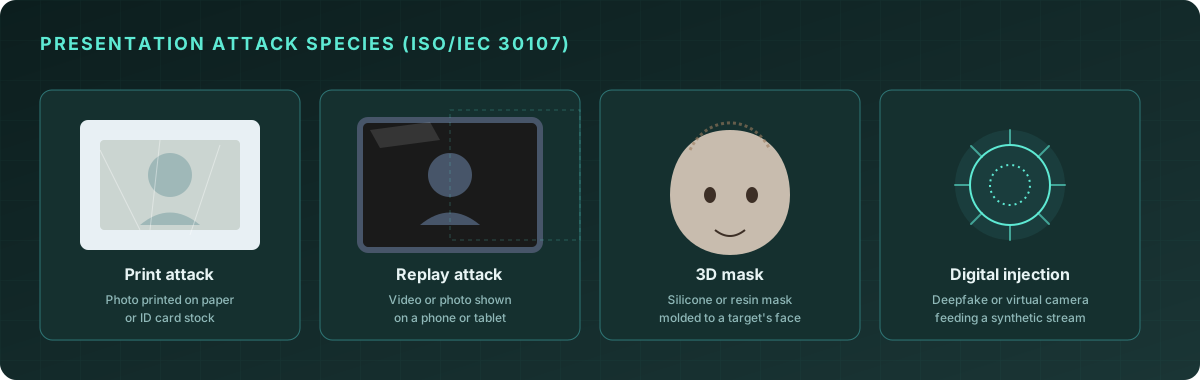
Print attacks present a photo of the target's face, printed on paper or card stock, to the camera. These are the cheapest attacks to mount and the easiest to detect — paper has a flat surface, visible print texture, and characteristic light reflection.
Replay attacks display a photo or video of the target on a second screen — a phone, tablet, or monitor — held up to the camera. Screens introduce moiré interference patterns when re-photographed, along with backlight glare and a narrower dynamic range than real skin.
3D masks are physical masks, often silicone or resin, molded to resemble the target's face. These defeat naive depth checks that just look for "is this flat," because a mask has real 3D structure. They're caught by finer-grained signals: skin sub-surface scattering (real skin diffuses light differently than silicone), micro-texture around the eyes and pores, and motion consistency.
Digital injection attacks don't present anything to a physical camera at all — they inject a synthetic video stream (deepfake, face-swap, or GAN-generated face) directly into the software pipeline, bypassing the camera entirely. This is the attack vector behind incidents like the Hong Kong deepfake call, and it's the fastest-growing category as generative video models improve. Defending against it requires a combination of liveness signals, device attestation, and session integrity checks — liveness detection on the received frame is necessary but not sufficient on its own.
How passive liveness detection works
Quantilence's liveness model runs four complementary analyses on a single submitted image:
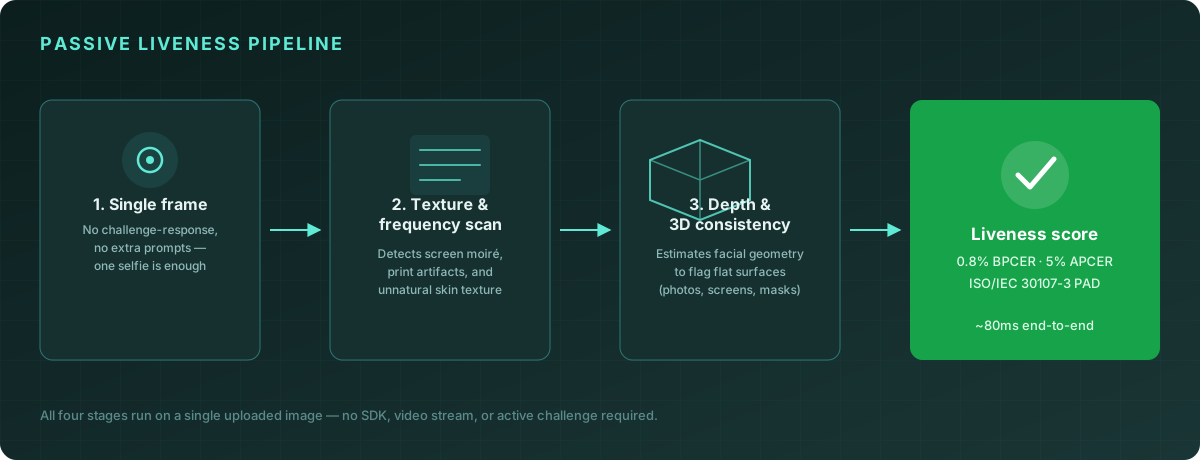
-
Single frame capture. No challenge-response sequence, no SDK requirements, no minimum video length. Any reasonably lit, in-focus face photo works — including the same image you'd send to face matching or face detection.
-
Texture and frequency analysis. The model examines high-frequency detail across the face region. Real skin has characteristic micro-texture (pores, fine lines, subtle color variation) that print and screen reproductions lose or distort. Screens additionally introduce regular frequency-domain artifacts from their pixel grid, which a print does not — so this stage helps distinguish which kind of attack is being attempted, not just whether one is happening.
-
Depth and 3D consistency. Even from a single 2D image, a model trained on millions of real and spoofed faces can estimate whether shading, shadows, and proportions are consistent with a real 3D face versus a flat surface or a mask. Specular highlights on skin behave differently than highlights on paper, glass, or silicone.
-
Liveness score. The four signals combine into a single score, thresholded against your configured sensitivity. The response includes the score, a pass/fail verdict, and the per-check breakdown so you can log and audit decisions.
const result = await client.faceLiveness.check({
  image: selfieBuffer,
});

console.log(result);
// {
//   success: true,
//   live: true,
//   liveness_score: 0.992,
//   checks: {
//     real_person: true,
//     no_print_attack: true,
//     no_replay_attack: true,
//     no_3d_mask: true
//   },
//   processing_time_ms: 78
// }
Measuring accuracy: APCER and BPCER
Liveness systems are evaluated using two error rates defined in ISO/IEC 30107-3:
| Metric | What it measures | Quantilence (default threshold) | |---|---|---| | APCER (Attack Presentation Classification Error Rate) | The percentage of spoof attempts incorrectly accepted as live | 5% | | BPCER (Bona Fide Presentation Classification Error Rate) | The percentage of real users incorrectly rejected as spoofs | 0.8% |
These two numbers trade off against each other — tightening the threshold to catch more spoofs (lower APCER) tends to increase false rejections of real users (higher BPCER), and vice versa. The right balance depends on your risk tolerance: a high-value financial onboarding flow might accept a higher BPCER (more friction for real users) in exchange for a lower APCER (fewer spoofs slipping through), while a low-stakes account recovery flow might tolerate the opposite.
Quantilence's /face-liveness endpoint accepts an optional threshold parameter so you can tune this tradeoff per use case rather than per deployment.
Pairing liveness with face matching
Liveness detection and face matching solve different problems and are most powerful combined:
- Face matching confirms who is in the image (does this selfie match the photo on the ID document?)
- Liveness detection confirms what is in the image (is this a real person captured live, or a presentation attack?)
A typical KYC selfie-verification flow runs both checks against the same captured image:
const [liveness, match] = await Promise.all([
  client.faceLiveness.check({ image: selfie }),
  client.faceSimilarity.compare({ image1: idPhoto, image2: selfie }),
]);

const verified =
  liveness.live &&
  liveness.liveness_score > 0.9 &&
  match.similarity[0].sim_score > match.threshold * 100;
Running both checks in parallel against the same frame means an attacker has to defeat both simultaneously with a single artifact — a printed photo of the legitimate user's face would pass face matching but fail liveness; a live video of an unrelated person's face would pass liveness but fail matching.
Implementation best practices
Run liveness on every selfie capture, not just at account creation. Step-up verification for high-risk actions (large transfers, password resets, adding a new payee) benefits from the same check — and is exactly the scenario the Hong Kong deepfake attack exploited.
Don't expose the threshold or score to the end user. Returning "liveness score: 0.42, try again" to a failed attempt teaches attackers how to calibrate their next attempt. Return a generic retry prompt instead, and log the detailed breakdown server-side for fraud review.
Combine with rate limiting and device signals. Liveness detection analyzes a single image; it can't see how many attempts have been made from a device or IP in the last hour. Pair it with your existing fraud-scoring infrastructure for defense in depth.
Re-run liveness if the image is re-submitted. If your flow allows users to retake a photo, treat each submission as a fresh liveness check — don't cache a "passed" state from an earlier attempt against a different image.
Log the full check breakdown. When liveness fails, the per-check fields (no_print_attack, no_replay_attack, no_3d_mask) tell your fraud team what kind of attack was attempted, which is valuable signal for pattern detection across users.
Frequently asked questions
Does liveness detection require a video or special camera hardware? No. Quantilence's liveness check works on a single standard image — the same selfie you'd capture for face matching on any phone or webcam camera.
Can liveness detection be fooled by a high-quality deepfake video? Passive liveness on a single frame raises the bar significantly against deepfakes by checking texture, depth, and consistency signals that current generative models still struggle to reproduce perfectly. However, digital injection attacks (where a synthetic stream is fed directly into the pipeline rather than captured by a camera) require additional defenses — device attestation and session integrity — beyond image-level liveness.
How does liveness detection differ from face anonymization or blurring? They're unrelated: liveness detection verifies that a face image was captured from a real person, while face anonymization (blurring or pixelating detected faces) is a privacy tool for redacting identities in photos and video. See our guide to face anonymization and GDPR for the latter.
What happens to the images sent for liveness checks? Images are processed in memory for the duration of the request and are not retained — consistent with Quantilence's no-biometric-storage policy across all face products.
Conclusion
As generative AI makes synthetic faces and voices cheaper and more convincing, the gap between "looks like the right person" and "is a live person" is exactly where fraud is moving. Passive liveness detection closes that gap without adding friction — no extra prompts, no special hardware, just one more signal evaluated alongside the face match you're already running.
The Quantilence Face Liveness API is available with 500 free requests per month. Try it on your own selfies →