KYC OCR Best Practices: Reducing Manual Review by 80%
How to design a KYC document verification pipeline that maximizes automation rates while maintaining compliance. Covers confidence thresholds, fallback flows, and audit trails.
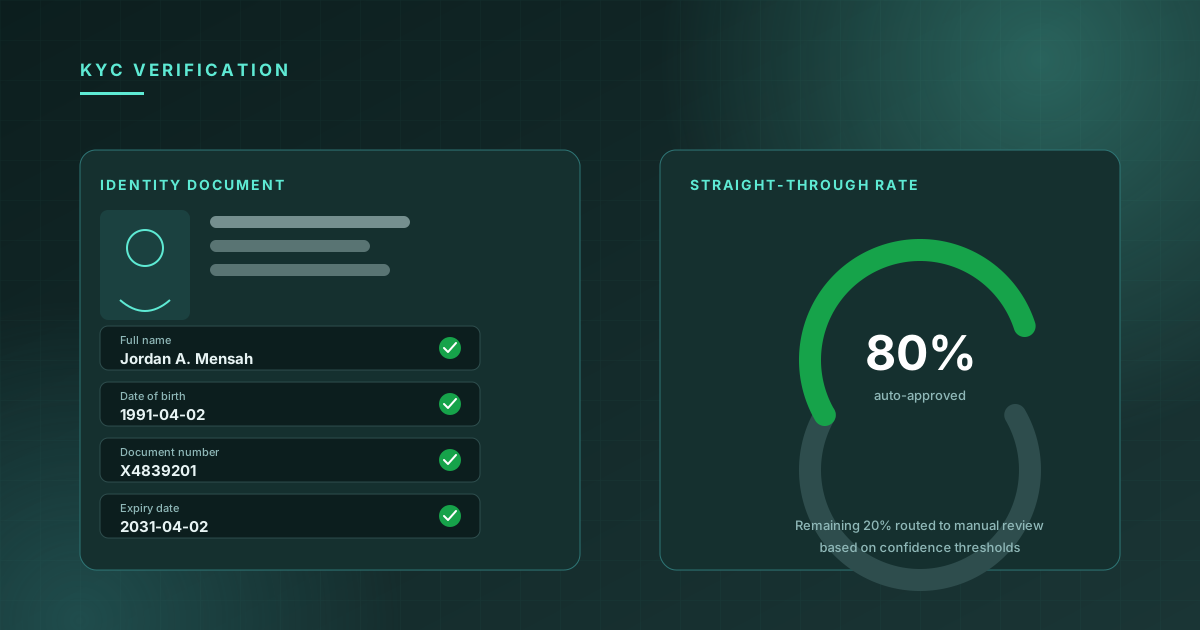
Know Your Customer compliance is one of the highest-stakes document processing use cases. The documents matter — a misread date of birth or a missed expiry date can create real compliance exposure. But manual review at scale is expensive and slow.
The teams that achieve 80%+ automation rates aren't just using better OCR — they're designing smarter pipelines around confidence scores.
The confidence threshold architecture
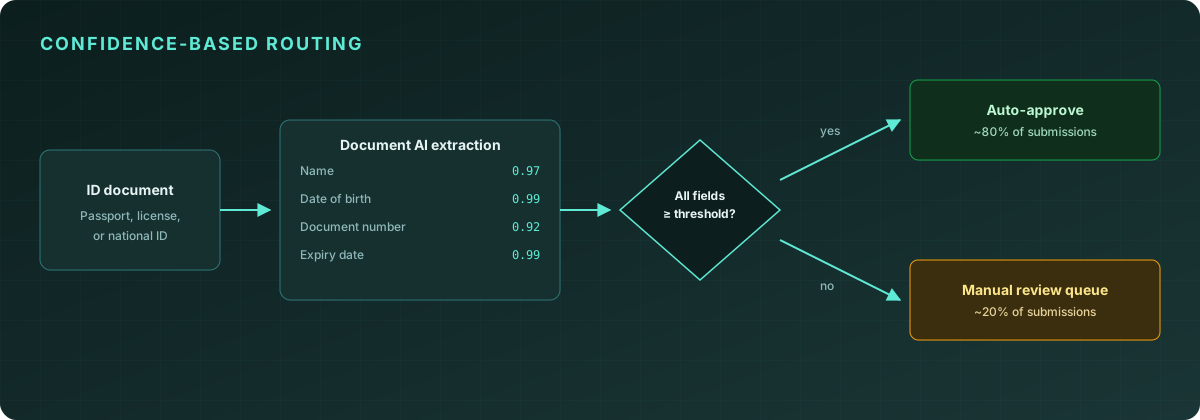
Every field extracted by a document AI system should have a confidence score. The key architectural insight is: not all fields require the same confidence threshold.
For a name field on a driver's license, 0.85 confidence might be acceptable — names have limited variation and the downstream risk of a slightly incorrect reading is low.
For a date of birth, you want 0.95+. A wrong DOB against a sanctions list match is a compliance failure.
For an expiry date on a passport, 0.98. An expired document that passes verification creates regulatory risk.
This tiered approach — different thresholds for different fields — lets you automate the vast majority of clean documents while routing only genuinely ambiguous cases to human review.
const result = await client.documentAI.extract({ file: idImage });

const requiresReview = Object.entries(result.fields).some(
  ([field, data]) => {
    const threshold = COMPLIANCE_THRESHOLDS[field] ?? 0.85;
    return (data?.confidence ?? 0) < threshold;
  }
);

if (requiresReview) {
  await queue.add("manual-review", { result, imageUrl });
} else {
  await processVerification(result);
}
Document quality gates
A common mistake is attempting extraction on documents that are too degraded to process reliably. Running extraction and getting low confidence on every field wastes compute and creates noise in your review queue.
Add a quality gate before extraction:
-
Resolution check. Minimum 150 DPI for reliable extraction. Most mobile captures are 300 DPI+ but some integrations serve compressed thumbnails.
-
Glare detection. A simple mean pixel intensity check on the image corners catches most cases of flash glare obscuring key fields.
-
Blur detection. Laplacian variance below a threshold indicates motion blur. Better to ask the user to retake than to attempt extraction.
These checks run in under 10ms client-side and dramatically reduce your false-negative extraction rate.
Audit trail design
For regulated industries, the audit trail is as important as the extraction itself. Your pipeline should log:
- Input hash. SHA-256 of the original document. Proves the document wasn't modified post-extraction.
- Extraction result. Full JSON response including all confidence scores.
- Decision. Whether the document was accepted, rejected, or routed to review.
- Reviewer action. If manually reviewed: who, when, what they changed.
This chain-of-custody record is what auditors and regulators ask for. Design it in at the start, not as an afterthought.
Handling edge cases gracefully
The documents that break pipelines fall into predictable categories:
Expired documents. Extract the expiry date with high confidence first. Fail fast if expired — don't complete the full extraction.
Foreign documents. A Kenyan national ID has different field structure than a US driver's license. Document type classification (usually available from the extraction API) should route documents to type-specific validation logic.
Damaged or partial documents. If a required field (document number, DOB) returns null confidence, trigger a re-capture flow with a user-facing prompt. "We couldn't read your document number — please ensure the document is flat and well-lit."
Tampered documents. Document AI can't reliably detect sophisticated tampering. Pair extraction with a dedicated document authenticity check if your risk model requires it.
Measuring your pipeline
The metric that matters is straight-through processing rate (STP): the percentage of submitted documents that complete the pipeline without manual intervention. Track it per document type and per extraction field.
If your overall STP is 78% but it's 92% for passports and 61% for state IDs, you know where to focus optimization. The 61% cohort has a specific quality or extraction issue to debug.
Target STP rates by document type:
- Passports (standard): 92–96%
- National IDs: 85–92%
- Driver's licenses (US): 88–94%
- Driver's licenses (international): 78–88%
Anything below these ranges usually indicates a document quality issue in your intake flow, not an extraction accuracy problem.
Quantilence Document AI returns per-field confidence scores that make this kind of threshold-based architecture straightforward to implement. See the Document AI docs →