Layered Fraud Prevention: Combining Liveness, Similarity, and Recognition
Why no single face API check is enough to stop onboarding fraud, and how to combine liveness detection, face similarity, duplicate search, and face detection into one decision.
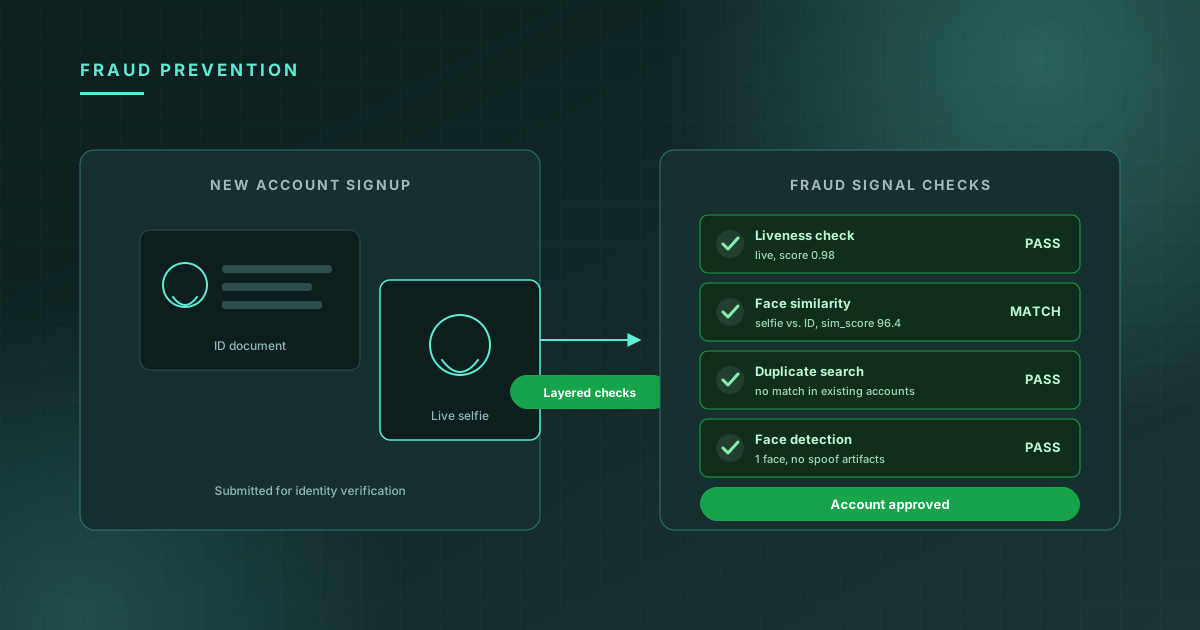
Onboarding fraud doesn't look like one attack — it looks like several different attacks that happen to arrive through the same form. A fraud ring uploads a stolen ID with a printed photo held up to a webcam. A user creates a second account after being banned, using a slightly different name but the same face. A bot submits a corrupted image hoping the pipeline fails open. Each of these defeats a different check, and a system built around only one check will stop one of them and let the other two through.
This post walks through the four checks that, combined, cover the most common onboarding fraud patterns — face detection, liveness detection, face similarity, and 1:N face recognition — and how to combine their outputs into a single approve / review / block decision.
Why one check isn't enough
Each of these APIs answers a narrow, specific question:
- Face detection: "Is there a usable face in this image, and is the image itself valid?"
- Liveness detection: "Is this a real person in front of the camera right now, or a photo/video/mask?"
- Face similarity: "Does this selfie match the photo on this ID document?"
- Face recognition (1:N search): "Have we seen this face before, under a different account?"
A passing result on any one of these tells you almost nothing about the others. A printed photo of a legitimate user's face will pass face similarity (it's genuinely the same face) and may even pass face detection (it's a clear, well-lit image) — but it should fail liveness. A real, live person using their own face will pass liveness and similarity — but if they already have three banned accounts under different names, only a duplicate search catches that. Treating any single check as sufficient leaves an obvious gap for the attack that check doesn't cover.
Layer 1: Face detection as a quality gate
Before running any identity logic, face detection answers a cheaper, more basic question: is this image even processable? Run it first, and reject obviously bad submissions before they consume a liveness or similarity check:
const detection = await client.faceDetection.analyze({ image: selfie });

if (detection.face_count === 0) {
  return reject("No face detected — please retake your photo");
}
if (detection.face_count > 1) {
  return reject("Multiple faces detected — please submit a photo of yourself alone");
}
This is the cheapest check in the pipeline and it catches a meaningful share of low-effort fraud and honest user error alike — corrupted uploads, photos of the wrong thing entirely, group photos submitted by mistake. Filtering these out here means your liveness and similarity checks only run against images that are at least structurally valid, which also makes their results easier to interpret: a low similarity score on an image that did pass detection is meaningful in a way a low score on a garbage image isn't.
Layer 2: Liveness — is this a real person, right now?
Liveness detection is the layer that specifically targets presentation attacks: printed photos, photos of photos, screen replays, and masks. It's the check most directly aimed at the "stolen ID + printed selfie" attack pattern:
const liveness = await client.faceLiveness.check({ image: selfie });

if (!liveness.live || liveness.liveness_score < 0.85) {
  return flagForReview("Liveness check failed", { liveness });
}
The detail covered in our liveness post is worth repeating here: liveness and similarity test completely different things, and a system that only runs one of them has a predictable hole. Liveness without similarity means an attacker could use their own live face against someone else's stolen ID (liveness passes, but the face doesn't match the ID). Similarity without liveness means an attacker could hold up a printed photo of the legitimate user (the photo matches the ID, but it's not a live person). You need both.
Layer 3: Face similarity — does the selfie match the ID?
This is the core 1:1 check covered in detail in our face similarity post: does the live selfie belong to the same person as the photo on the submitted ID document?
const similarity = await client.faceSimilarity.compare({
  image1: idPhoto,
  image2: selfie,
});

const { sim_score } = similarity.similarity[0];
if (sim_score < 80) {
  return flagForReview("Selfie does not match ID photo", { sim_score });
}
For fraud prevention specifically, this layer catches the most common identity fraud pattern: someone using a stolen or purchased ID document that belongs to a different person than the one submitting the selfie. The threshold here matters more for fraud prevention than for general identity flows — a financial onboarding flow should generally use a higher threshold (80+) than, say, a low-stakes re-authentication flow, because the cost of a false accept (an impostor matching as the legitimate ID holder) is higher.
Layer 4: Duplicate search — have we seen this face before?
This is the layer most teams skip, and it's the one that catches an entirely different category of fraud: not "is this person who they claim to be" but "is this person trying to create another account when they already have one — possibly one that was banned."
const search = await client.faceRecognition.search({
  image: selfie,
  top_k: 5,
});

const topMatch = search.matches[0];
if (topMatch && topMatch.score > search.threshold) {
  return flagForReview("Face matches an existing account", {
    existingAccountId: topMatch.name,
    score: topMatch.score,
  });
}
This requires maintaining a gallery of enrolled faces from existing accounts — typically built up by enrolling each new user's selfie into the search index after they pass the other checks. The query here isn't "does this match a specific person" (that's similarity); it's "does this match anyone in our existing user base," which is exactly the 1:N search problem.
This layer is what catches synthetic identity rings (the same operator creating many accounts with different stolen IDs but reusing their own face for the liveness check) and ban evasion (a user banned for fraud or abuse creating a new account under a different name). Neither liveness nor similarity catches these — both of those checks pass cleanly, because the person genuinely is a live human and genuinely does match the ID they submitted. Only a search against your own user base reveals the duplicate.
Combining the four signals into a decision
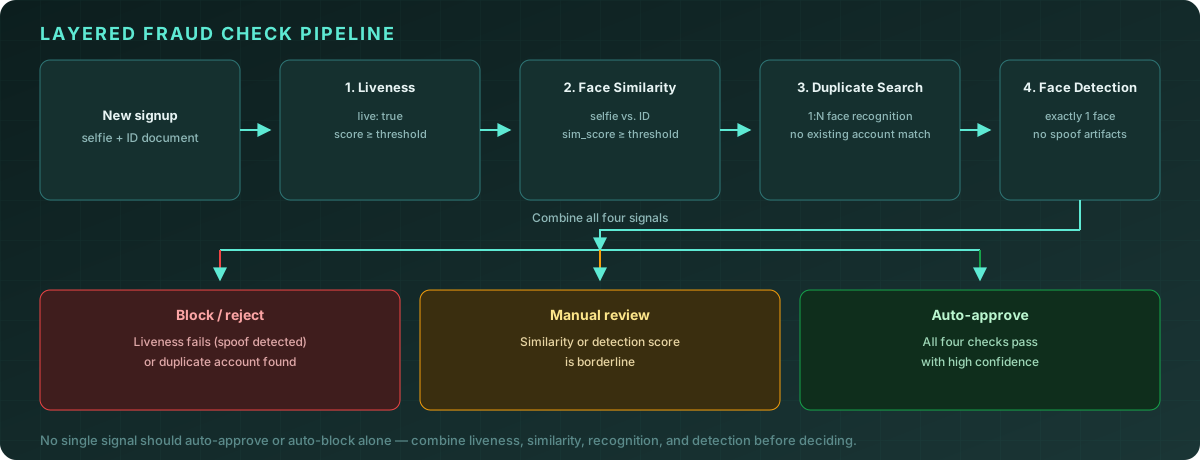
The pipeline diagram above shows the shape of the decision: each layer produces a signal, and the combination — not any single layer — determines the outcome.
async function evaluateSignup(idPhoto: Buffer, selfie: Buffer) {
  // Layer 1: quality gate
  const detection = await client.faceDetection.analyze({ image: selfie });
  if (detection.face_count !== 1) {
    return { decision: "reject", reason: "invalid_image" };
  }

  // Layer 2 & 3 run independently — both are needed
  const [liveness, similarity] = await Promise.all([
    client.faceLiveness.check({ image: selfie }),
    client.faceSimilarity.compare({ image1: idPhoto, image2: selfie }),
  ]);

  if (!liveness.live || liveness.liveness_score < 0.7) {
    return { decision: "block", reason: "liveness_failed", liveness };
  }

  const simScore = similarity.similarity[0].sim_score;
  if (simScore < 60) {
    return { decision: "block", reason: "identity_mismatch", simScore };
  }

  // Layer 4: duplicate check
  const search = await client.faceRecognition.search({ image: selfie, top_k: 1 });
  const duplicate = search.matches[0]?.score > search.threshold;
  if (duplicate) {
    return { decision: "block", reason: "duplicate_account", match: search.matches[0] };
  }

  // Borderline scores → manual review, not auto-approve
  if (liveness.liveness_score < 0.85 || simScore < 80) {
    return { decision: "review", reason: "borderline_scores", liveness, simScore };
  }

  return { decision: "approve", liveness, simScore };
}
Two design choices in this function are intentional and worth calling out:
Hard failures (block) are different from soft failures (review). Liveness clearly failing, identity clearly not matching, or a clear duplicate — these are strong, specific signals worth blocking on directly. Borderline scores on similarity or liveness are not strong enough to auto-block on their own (a legitimate user with a poorly-lit selfie can score borderline on both), but they're also not strong enough to auto-approve. Manual review is the correct outcome for "the signals are ambiguous," not "block by default."
Layers run in order of cost, not just logical order. Face detection runs first because it's the cheapest and catches the most basic failures. Liveness and similarity run in parallel because they're independent checks against the same two images. Duplicate search runs last because it's the most expensive (a search against a potentially large gallery) and only needs to run for submissions that have already passed the cheaper checks.
Which fraud pattern, which layer
| Fraud pattern | Layer that catches it | |---|---| | Corrupted/invalid image, no face, group photo | Face detection | | Printed photo or screen replay of legitimate user's face | Liveness | | Stolen/purchased ID document with a different person's selfie | Face similarity | | Ban evasion — same person, new account, different stated identity | Duplicate search (face recognition) | | Synthetic identity ring reusing one operator's face across many fake IDs | Duplicate search (face recognition) |
Notice that no row has more than one layer next to it, and no layer covers more than one or two rows. That's the point — these checks are complementary, not redundant. Removing any one of them reopens a specific, predictable gap.
Common pitfalls
Running checks sequentially when they could be parallel. Liveness and similarity operate on the same two images and don't depend on each other's output — running them in parallel (as in the example above) roughly halves the latency of those two layers compared to running them one after another.
Auto-blocking on borderline scores. A score just below your similarity or liveness threshold isn't evidence of fraud — it's evidence of ambiguity, often caused by image quality rather than malicious intent. Auto-blocking these creates a steady stream of false positives (legitimate users blocked) that erodes trust and generates support load. Route them to review instead.
Skipping duplicate search because "we don't have a gallery yet." The gallery is built by enrolling users as they pass through the pipeline — start enrolling from day one, even if the gallery is small at first. By the time fraud rings start probing your signup flow at scale (which tends to happen once a product gets enough users to be worth attacking), you want the gallery already populated.
Logging only the final decision. Store the output of all four layers — liveness_score, sim_score, duplicate_match, face_count — for every signup, not just whether it was approved. When you tune thresholds later, or investigate a fraud pattern that got through, this is the data you'll need.
Frequently asked questions
Do all four checks need to run for every signup? Face detection should run for every submission since it's cheap and gates the rest. Liveness and similarity are the core of most identity flows. Duplicate search is most valuable for flows where ban evasion or synthetic identities are a real risk (financial accounts, marketplaces with reputation systems) — for very low-risk signups, it may be reasonable to skip it, but it's the layer most often missing when a fraud pattern gets through that the other three didn't catch.
What if a legitimate user fails liveness because of bad lighting? This is exactly what manual review is for. A liveness score that's low but not zero, combined with a high similarity score, suggests a real person with a poor-quality capture rather than a spoof attempt — route to review rather than blocking outright, and consider prompting the user to retake the photo with better lighting before escalating to a human reviewer.
How often should the duplicate-search gallery be updated? Enroll a user's face into the gallery once they pass all checks and the account is approved. If an account is later banned for fraud or abuse, keep its enrolled face in the gallery (or move it to a separate "banned faces" gallery) — this is what allows duplicate search to catch that person if they attempt to sign up again.
Can these checks be bypassed by a sufficiently sophisticated attack? No individual check, and no combination of checks, makes fraud impossible — the goal is to raise the cost and sophistication required to commit fraud successfully, and to ensure that the cheap, common attacks (printed photos, mismatched IDs, repeat signups) are caught reliably. Layering checks means an attacker has to defeat all of them simultaneously, which is a meaningfully higher bar than defeating one.
Conclusion
Fraud prevention for identity-based onboarding isn't a single API call — it's a small pipeline where each step closes a specific gap the others leave open. Face detection filters invalid submissions cheaply. Liveness stops presentation attacks. Face similarity confirms the selfie matches the claimed identity. Duplicate search catches the people who pass both of those checks but have already been here before under a different name. Combined, with sensible thresholds and a manual review path for ambiguous results, these four checks cover the fraud patterns that matter most in practice.
Explore the Face Detection, Liveness, Similarity, and Recognition APIs →