Document Classification: Routing Mixed Documents to the Right Pipeline
How automated document classification works, what confidence and alternatives mean in the response, and how to use them to route passports, invoices, statements, and contracts to the right downstream system.
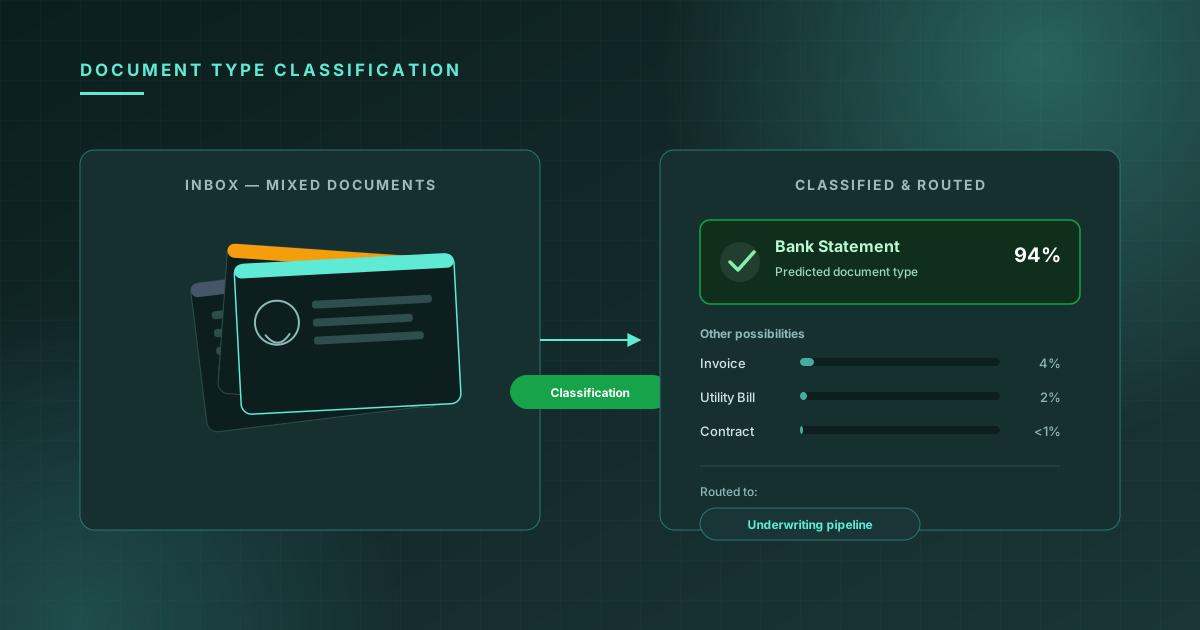
Most document-processing pipelines are built around an assumption that turns out to be wrong more often than teams expect: that you already know what kind of document you're looking at. A KYC pipeline assumes it's getting an ID. An accounts-payable pipeline assumes it's getting an invoice. But the actual inputs — uploads from a web form, attachments from an inbound email, a folder of scanned mail — are a mix. Users attach the wrong file. A "driver's license" upload is sometimes a passport. An "invoice" forwarded by email is sometimes a bank statement.
Document classification solves the problem one step before OCR or Document AI ever runs: given an arbitrary document image, predict what kind of document it is, so the rest of the pipeline can apply the right extraction logic, validation rules, and routing.
What the API returns
A classification request takes a single document image and returns a predicted type, a confidence score, and a ranked list of alternatives:
import { Quantilence } from "@quantilence/sdk";

const client = new Quantilence({ apiKey: process.env.QUANTILENCE_API_KEY });

const result = await client.documentClassification.classify({
  document: fileBuffer,
});

console.log(result);
// {
//   success: true,
//   document_type: "bank_statement",
//   confidence: 0.94,
//   alternatives: [
//     { document_type: "invoice", confidence: 0.04 },
//     { document_type: "utility_bill", confidence: 0.02 },
//     { document_type: "contract", confidence: 0.003 }
//   ],
//   processing_time_ms: 88
// }
The supported types cover the documents that show up most often in onboarding, lending, and back-office workflows: passport, drivers_license, national_id, invoice, bank_statement, utility_bill, contract, and a catch-all other for anything that doesn't fit.
Why confidence and alternatives matter more than the top label
It's tempting to use only document_type and ignore the rest of the response — but confidence and alternatives are what make classification useful as a routing decision rather than just a label.
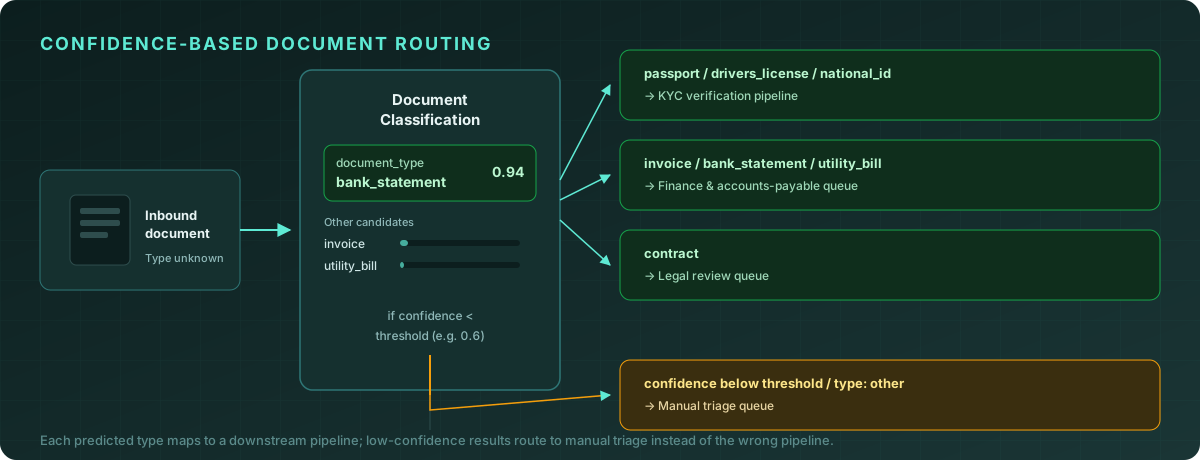
A confidence of 0.94 on bank_statement means the model is highly certain — route it straight to your finance pipeline. A confidence of 0.52 with alternatives showing invoice at 0.48 means the model sees this document as nearly a coin flip between two types. Routing that document straight into either pipeline risks running the wrong extraction logic against it. The right move is to send it to manual triage, where a human picks the correct type in seconds — far cheaper than having an automated pipeline silently misprocess it.
This is the same confidence-threshold pattern used in KYC OCR pipelines: high-confidence results go straight through, borderline results go to a human, and the threshold is a business decision, not a fixed constant.
Where classification fits in the pipeline
Document classification is a routing step, not an extraction step — it runs before OCR or Document AI, and its output decides which extraction path the document takes next:
async function processInboundDocument(file: Buffer) {
  const classification = await client.documentClassification.classify({
    document: file,
  });

  if (classification.confidence < 0.6) {
    return queueForManualTriage(file, classification);
  }

  switch (classification.document_type) {
    case "passport":
    case "drivers_license":
    case "national_id":
      // Structured extraction tuned for ID documents
      return processIdentityDocument(file);

    case "invoice":
    case "bank_statement":
    case "utility_bill":
      // Structured extraction tuned for financial documents
      return processFinancialDocument(file);

    case "contract":
      return queueForLegalReview(file);

    default:
      return queueForManualTriage(file, classification);
  }
}
Each branch can then call Document AI with extraction logic specific to that document type — an invoice extractor looks for line items and totals; an ID extractor looks for name, date of birth, and document number fields. Without classification, you'd either run every extractor against every document (wasteful and noisy) or assume the type based on which form field the user uploaded to (wrong often enough to matter).
Setting thresholds per document type, not globally
A single global confidence threshold is a reasonable starting point, but different document types carry different costs for misclassification, and your thresholds should reflect that:
| Document type | Misroute risk if wrong | Suggested threshold |
|---|---|---|
| passport / drivers_license / national_id | High — feeds identity verification and compliance decisions | Higher (0.75+); low-confidence IDs go to manual review |
| invoice / bank_statement / utility_bill | Medium — wrong extraction fields, but usually caught downstream | Moderate (0.6–0.7) |
| contract | Medium — routed to legal review either way, so misrouting mainly costs time | Moderate (0.6) |
| other | N/A — already the fallback | Always manual triage |
The reasoning is the same as setting thresholds for face similarity: the threshold isn't a property of the model, it's a statement about how expensive a wrong answer is in your pipeline. An ID document misclassified as a utility bill and run through the wrong extractor could mean a KYC check silently never happens. An invoice misclassified as a bank statement mostly means a finance team member re-files it.
Handling the other bucket
Every classification system needs an explicit catch-all, and other is it. Documents land here when they genuinely don't match any of the trained categories — a resume, a screenshot, a photo of a whiteboard, a form you don't yet support.
Two mistakes are common with other:
Treating it as an error. It isn't — it's a valid, expected classification result for documents your pipeline doesn't (yet) have a path for. Log it, route it to manual triage, and move on.
Ignoring volume trends in other. If other suddenly accounts for 15% of inbound documents when it's normally 2%, that's a signal — either an upstream change is sending you a new document type you should add support for, or something is breaking earlier in the pipeline (corrupted uploads, wrong file format) and documents that should classify cleanly are landing in the catch-all instead.
Combining classification with extraction in one pass
For high-throughput pipelines, it's worth measuring whether the extra classification call is worth its latency. In most cases it is — processing_time_ms for classification is typically under 100ms, far less than the extraction step that follows, and the cost of running the wrong extractor (wasted compute, malformed output, a document that needs to be reprocessed) is higher than one extra API call:
async function classifyAndExtract(file: Buffer) {
  const classification = await client.documentClassification.classify({
    document: file,
  });

  // Only proceed to extraction once we know which extractor to use
  if (classification.confidence < 0.6) {
    return { status: "needs_review", classification };
  }

  const extraction = await runExtractorFor(classification.document_type, file);

  return {
    status: "processed",
    document_type: classification.document_type,
    confidence: classification.confidence,
    extraction,
  };
}
Storing document_type and confidence alongside the extraction result also pays off later — if you ever need to audit why a particular document was processed a certain way, or retrain/tune thresholds based on real traffic, you'll have the classification decision on record rather than having to guess from the extraction output alone.
Common pitfalls
Skipping classification for "obvious" upload forms. A form field labeled "Upload your driver's license" feels like it makes classification redundant — but users attach passports, attach the wrong file entirely, or attach a photo of their dog. Classification catches this before it reaches an ID-specific extractor that will either fail loudly or, worse, extract garbage fields from the wrong document type.
Using one threshold for every type. As covered above, the cost of a wrong classification varies by type and downstream use. A single global threshold is either too strict for low-stakes types (sending too much to manual review) or too lax for high-stakes types (letting misclassified IDs through).
Not logging alternatives. When you only store the top-1 document_type, you lose the information needed to understand near-miss classifications. If a meaningful fraction of your invoice documents have bank_statement as a close second alternative, that's useful signal — maybe your invoice template and bank statement template look more similar than expected, and it's worth tightening the threshold for that pair specifically.
Re-classifying on every retry. If a document fails downstream processing and gets retried, there's no need to re-run classification — store the result from the first pass and reuse it, unless the retry is specifically because classification itself was the suspected failure point.
Frequently asked questions
What happens if a document contains multiple pages of different types? Classification operates on a single image. For multi-page documents (a PDF with a cover letter followed by a contract, for example), classify each page independently, or pre-process to extract the relevant page before classification — submitting a multi-page PDF as one image will classify based on whichever page renders, which is usually not what you want.
Can I add custom document types beyond the supported list?
The current set of types (passport, drivers_license, national_id, invoice, bank_statement, utility_bill, contract, other) covers the most common categories across onboarding and back-office workflows. Documents outside these categories classify as other and should be routed to manual triage or a custom pipeline.
How is this different from Document AI? Document classification answers "what kind of document is this?" Document AI answers "what are the structured fields inside this document?" They're complementary — classification typically runs first to decide which extraction logic Document AI should apply, as shown in the routing example above.
Does classification require the document to be a clean scan? No — the model is trained to handle photos, phone camera captures, and scans, which matters for real-world inputs like mobile uploads. As with any vision model, extreme blur, very low resolution, or heavy cropping that removes identifying layout features will reduce confidence.
Conclusion
Document classification is a small, fast API call that does an outsized amount of work in a mixed-document pipeline: it turns "we don't know what this is" into a routing decision, before any extraction logic runs against the wrong assumptions. The confidence score and alternatives are what make that routing decision robust — high-confidence predictions go straight through, low-confidence and near-tie predictions go to a human, and both paths beat silently running the wrong extractor against a document it was never built for.
The Quantilence Document Classification API is in beta and available with free requests for testing. Try it on your own documents →